Neteye Website Relaunch

Neteye the Hamburg based interactive agency just launched their new website. Discover lots of cool works in a new way of interactive showreel. Neteye


Texture of Stones… wall… marble… wood… fabric, but especially free textures?
If you are searching for free textures to download no problem! Here my little personal link collection of high resolution textures:
Texture King - Free Stock Textures! Great!!!
Mayang Textures - Over 3400 textures free to download
Cg Texture - Many textures and tutorials related
Wood: Arroway texture - Please, don’t abuse the system! Download only textures you really need.
Texture Wharehouse - Free, High Resolution Textures to Designers and 3D Artist.
Marble Textures - A large marble’s texture collection
Mega Textures - Mega-Tex Studios offers you lots of high quality textures in various categories.
I hope you like my little collection.Bookmark this in your favourite pages and enjoy it!

It’s created by Charles Hollemeersch and it’s incredible how it get a ocean model so similar from the real ocean waves!
This 3D Studio Max plugin adds a new geometry object which generates a statistically generated ocean wave suface. It allows you to set parameters like wind direction and strength, required detail, … to control the aperance of the sea surface.
This is the same technic used in the movie “Titanic” to generate the ocean.
It’s so simple to use: this 3D Studio Max plugin adds a new geometry object which generates a statistically generated ocean wave suface.
I think you could be surprised how simple and how incredible is this plug-in, so I encourage all of you to downlaod and try it… only try it once and you’ll love it.
OceanWaves Plugin
<>
There’s no just english sites to find a great educational material, but you can find in many parts of the world people producing excellent tutorials.
This time we’re going to Spain!
Few years ago, Pedro Saiz Bilbao realized a very informative pages about V-ray and its settings. Many examples, many images, many experiments.. I love his work: very, very useful.
This tutorial has been wrote for V-ray 1.49 but it’s valid too. I often use it to remember details or settings values. Check and add it to your bookmarks!
V-ray panels in deep

Yes, it’s right. There’s some problem using both RPC and V-ray. When I had the same problem I must retouched the render with Adobe Photoshop. That was the only solution I found.
But not any RPC Archvision library has the same bug. There’s same collection that works fine, for example the Cars.
Anyway if you already completed your work and RPC doesn’t project shadows I suggest to “repair” it with a little postproduction (with Photoshop for example).
I think this is the best and fast way.
Besides if you want to get a more photorealistic renders I suggest to try different solutions like 3d low-poly people, for example Axyz-Design.
It allows a free download to try the models so… enjoy it!
Axyz Design: Free 3d models - Low Poly

This is the famous sentence from the movie “300″. As you can notice there’s a very massive use of visual effects (vfx) in the movie… surely, the most famous of this effects is Time Remapping.
This technic is often used in fighting scenes and it consists in going slowly and suddenly faster with footage. In this way it’s simple to create high impact scenes!
If you are interested in, you can have a look at this After Effects tutorial made by Andrew Kramer.Enjoy it!
Tutorial Time Remapping

So to make a good rendering we have to create a good photographic set and put our object in.
I found a excellent tutorial on cgindia.org: how to make a perfect digital photographic set. In this tutorial you can have a look at vray settings. In spite of everything I think this tutorial is very important to understand how to set a digital set with classic rules: primary light, secondary light and back light.
Photographic set: how to make it with Vray

Why actually anybody use these old render engines? Maybe we love super excellent quality… sure! But we can obtain hi quality render with old technics!
If you know classic “real” lighting technic and you work with fine with photoshop you could have a great render in few minutes… or seconds!
I’m really impressed by an image found on Cg Society: look that and tell me what do you think!
Rendered without Global Illumination
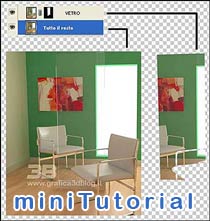
My personal solution is to render “normal” glasses with our render engines, and after abtain any kind of glass playing with Photoshop. You could be make many kind of Glasses in few seconds!
A software like Photoshop could be very, very helpfully to refine scenes: stop to make 3d images directly with your 3d studio max or Maya… think your render as a first part. The second one will be the photo retouch!
Follow this great tutorial:
Glass with photoshop

The most important fighting videogame,Tekken, is back! And now on PS3 high definition. It’s not a next-generation game, the gameplay is the same… so, what’s new?
Tha high definition, that makes exciting your playing experience, especially on big tv. There’s same faults too in the “poligonal engine” or in the explosions (always the same!). But generally sound effects and 3d graphic effects are really great.
So it’s funny fighting with your best friend..lol.. but just in your house, since it’s no possible playing online.
You can download this new version on the official site.It’s low cost if you have a Playstation 3 -> japanese consolle!
Tekken 5: official site

I didn’t know but there’s the funny mouse with a young, bungling chef.
The two leading actors became friends and… see the trailer now!
Ratatouille, the trailer