Showing posts with label 3d max. Show all posts

2.18.2008

finalF/X for 3ds Max 9 and 2008 Update Available Now!

cebas Computer, maker of finalRender®, today announced the release of finalF/X update for 3ds Max versions 9 and 2008. All users that purchased a finalF/X plugin within the last 2 months will get this update for free. read more!!

8.23.2007

The Redline of Dragon Walk

Hi there! This are the sequential steps of my scene “Dragon Walk” made for CGArena.com Challenge. I have used 3ds max 9 and mental ray renderer for this image.
see page!!

8.16.2007

"Head modeling using spline " by G.V.Prabhu


I would like to share my technique of modeling of the Human Head using spline and later we can convert it into a editabale poly. First get the good reference images of front and side pose. I used this reference.


8.14.2007

Rendering yellow Ferrari

tutorial from 3dm.com How to render ferrari by 3d max

read more

8.01.2007

glu3D | Maya 8.5

3Daliens.com develops glu3D: a fluid simulator software for 3dsMax and Maya. pWrapper plugin is a particle mesh surface envelope that helps representing any particle set.
Check our products page to see a description and check the download section for a trial version of the plugin.
Click to website!!

7.13.2007

The Making Of Lulu

Tutorial how to making of Lulu charactor form finalfantasy

Click to website!!

Making of DAWN,The Dinotaur

Tutorial from en.9jcg.com teaches you how to create a creature character from modeling, texturing to lighting and rendering as well as compositing.

Click to website!!

Tutorials: 3ds max: Hope to Another Sunrise

3D Kingdom has tutorial how to make another sunrise .Very easy to follow...

Click to website!!

7.12.2007

"The making of "Boulevard"" by Fabricio Micheli

3D Total just posted an elaborate tutorial on the fine art of modeling, texturing and lighting a complex scene.

Click to website!!

6.22.2007

Video Tutorials : 3DS Max | Maya | XSI

Lots of very useful Video Tutorials for 3ds Max, Maya and XSI are available for free download.
Tutorials Link !!

6.19.2007

Enzo 3D Paint Plugin For PhotoShop


Enzo is a unique 3d model texture paint system that is fully integrated inside Photoshop. Enzo is not a standalone application, but a set of sophisticated that work together to turn Photoshop into a robust 3d paint package. You can use Enzo to paint directly on the 3d models in Photoshop. Enzo can import 3d models in Maya, XSI, LWO, 3ds, obj, Rhino and AutoDesk FBX formats.Enzo: 3d paint for photoshop - Download Trial

6.18.2007

Advanced illumination in 3ds max

Even if very often I like to write about Vray or Maxwell don’t forget that 3ds max has a feature called “Advanced Illumination“.
The net is quite plenty of V-ray tutorials, so I like to mark this interesting tutorial, wrote by the Cg Artist Mario Malagrino, about Advanced illumination in 3d studio max.
The subject is the usual and famous teapot, perfect as an object test… and the technic simulates the illumination techniques of a photo studio.
As I often write the classical method is of the best way to get beautiful lighning in your renders.
3ds: Advanced Illumination
If you are interested in photo studio loghtning have a look at Digital studio with V-ray

Digimation Releases Max Monster Pak With Bonus 3ds Max Plug-ins

It seems that 3d Models and Textures are every where and the demand of 3d products are hitting all time high. Now Digimation has announced Max Monster Pak; a collection of more than 13,000 3D models, textures and motion capture files for users. As far as in my knowledge it is never seen before offer; as they are offering ten of Digimation's most popular plug-ins for 3ds Max including; Bones Pro 3, Tree Factory, Chameleon, Max Sculpt, Clay Studio, DigiPeople, Sand Blaster, etc for first fifty customers. Its a win-win situation man... so if got some "G",- it's a prefect and value for money offer to invest In..............more info!!Related Posts:3D models Collection of Apple Products EverMotion Released Archmodels Vol.27 and 28 CGIndia Released, Free 3D Models Collection V1 ArchVision Releases New 3D Casual People CollectionDosch Design has Released New 3d models and Textures Products

6.08.2007

Ocean Waves: Plugin for 3ds Max

OceanWaves is a very, very interesting plugin to simulate…. Ocean Waves, obvious!
It’s created by Charles Hollemeersch and it’s incredible how it get a ocean model so similar from the real ocean waves!
This 3D Studio Max plugin adds a new geometry object which generates a statistically generated ocean wave suface. It allows you to set parameters like wind direction and strength, required detail, … to control the aperance of the sea surface.
This is the same technic used in the movie “Titanic” to generate the ocean.
It’s so simple to use: this 3D Studio Max plugin adds a new geometry object which generates a statistically generated ocean wave suface.
I think you could be surprised how simple and how incredible is this plug-in, so I encourage all of you to downlaod and try it… only try it once and you’ll love it.
OceanWaves Plugin

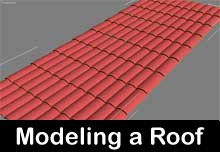
How to model a tiled roof with 3ds max


Neox, an user from Treddi.com (italian forum), realized a videotutorial showing step by step how to model a tiled roof with 3ds max.Modeling this kind of Roof is a very annoying thing, becouse in order to abtain a beautiful model you have to model tile by tile and you can’t use bump mapping or Displacement to obtain a good result.
In these 2 videotutorial you can see how to model one single tile (with a simple box + ben modifier) and how to put the tiles in a roof (Array function).
In the 2° brief videotutorial, you can see how to use Multires modifier to control polygon reduction without lose a good quality model.
Even if the forum is italian the videoturial are international… without speaker, just enjoy seeing it!
Videotutorial: Modellazione tegole - riduzione poligoni